The AI CRM built
for event promoters.
Create beautiful registration pages, grow your audience and bring fans back—with AI helping you build pages and prepare campaigns.
Work with Reggiee through ChatGPT desktop, Claude or Cursor. Bring your event brief to your favourite AI tool, then manage pages, audiences and campaigns in one workspace.
 ChatGPT
 Claude
 Cursor
Your favourite AI tools. Your event workspace.
Already use AI? Bring it to Reggiee.
Connect on Pro to help create pages, build tours and work with your event data from the tools you already know. Choose your tool to get set up.
ChatGPT connection currently uses the desktop app. Setup requirements are explained in each guide.
Integrations
Send every sign-up straight to ActiveCampaign.
Add your ActiveCampaign API key once, pick a list for each event, and new registrations sync automatically with name, email and phone.
Find your API key
In ActiveCampaign open Settings, then Developer. Copy the API URL and API Key shown under API Access.Add it to Reggiee
Open Integrations in Reggiee, paste both values into the ActiveCampaign card and test the key. It is stored encrypted.Choose a list per event
On each event, switch ActiveCampaign on and pick the list that sign-ups should be added to.One connected workspace for
LESS SETUP. MORE MOMENTUM.
More time promoting.
Less time setting things up.
Your next launch shouldn’t start
with another blank page.
Let AI help with the first draft. Keep your pages, audience and follow-up in one place.
Connect your favourite AI toolConnected AI tools available on Pro. Review your work before publishing or sending.
“Build our UK tour pages and help prepare the announcement for our jazz audience.”
One brief. Every tour stop.

Shared artwork. Individual dates. Ready for your review.
See the finished pages
From one event to a full tour.
Reggiee gives every campaign a polished place to convert interest into registrations. Launch a standalone event or connect every stop in a multi-event tour.
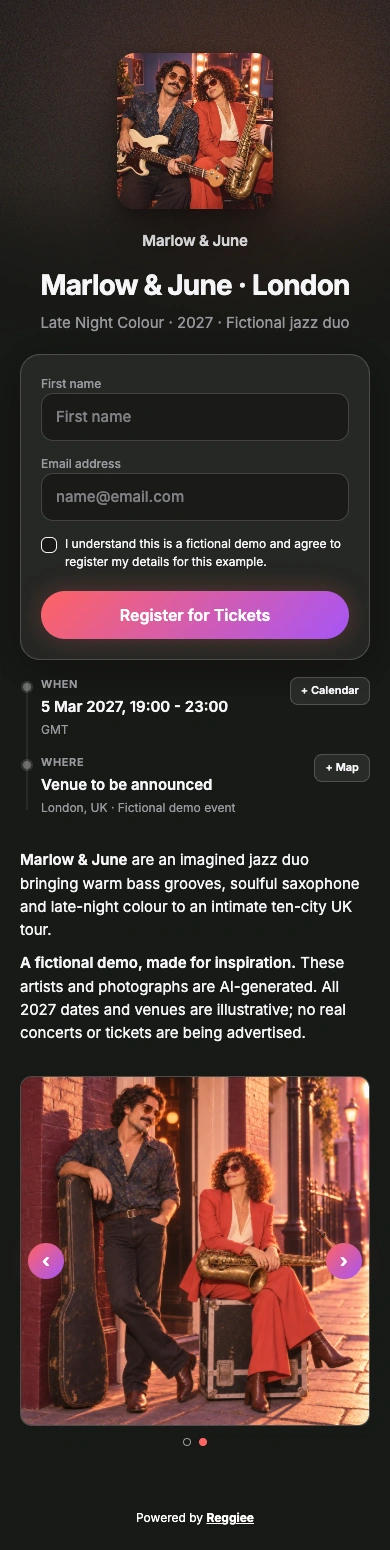
01 / BUILT FOR SINGLE EVENTS
Make the first impression count.
Turn your event into a page people want to explore. Lead with your artwork, tell your story and make the next step unmistakable.
Your brand. Your event.Turn interest into registrations.
Collect the details you need with a focused registration form. Give fans a simple way to join your audience before tickets go on sale.
Built for pre-registrationKeep the connection alive.
Show the venue, share the atmosphere and bring new registrations into your CRM. Your next campaign starts with the audience you build today.
Connected to your audienceExplore the event demo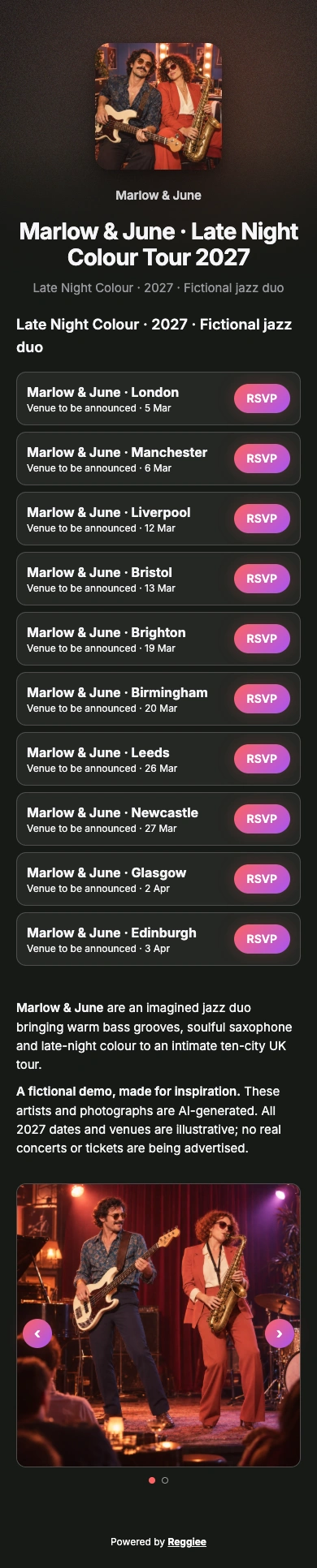
02 / BUILT FOR TOURS
Ten cities. One beautiful home.
Give the whole tour a single destination. Bring your artwork, story and every date together in one branded page.
A connected tour pageEvery stop gets its moment.
Let fans find their city and open its dedicated registration page. Keep the tour consistent while each event has its own details.
Individual pages for every dateGrow an audience in every city.
Bring registrations into your CRM, organise your audiences and prepare the next announcement from the same workspace.
From tour interest to your CRMExplore the tour demoA CRM that starts at registration
Every registration starts a relationship.
Your event page is the beginning. Bring new registrations and existing contacts into one audience you can organise and reach again.
- Group contacts into lists and segments
- Keep registration and contact activity together
- Review channel permissions before sending
- Prepare the next campaign from the same workspace
Jamie Taylor
London · Registered for Late Night Colour
One contact. The whole story.
- Discovered your eventArrived on the London registration page
- Joined your audienceRegistered and chose email updates
- Ready for your next campaignOrganise the audience and prepare a follow-up
Practical AI help
Start with a brief. Make it yours.
Use AI to help with the first draft, then review the details in your workspace.
Create your first event“Build a page for our London show.”
Start with your date, venue and event brief. Review the generated page, refine the branding and publish when ready.
“Write an announcement for our jazz audience.”
Use AI to help draft campaign copy. Choose your list, edit the message and check channel permissions.
“Create pages for every stop on this tour.”
Use a connected AI tool to help build a multi-city tour, then review the dates and individual pages in Reggiee.
Made for repeat promoters
One event today. Twenty dates next month.
Whether you run a monthly club night, a touring show or a portfolio of festivals, Reggiee lets you reuse what works without starting from scratch.
- Build linked registration pages for each tour stop
- Keep brand details consistent across every page
- Connect the right list and tracking to each event
- Switch between brands and manage their audiences
Simple plans. Room to grow.
Start with your next event.
Grow from there.
Choose a plan for your event workspace, then pay for messaging as you use it.
View plans and pricing7-day free trial
Try Growth
Pages, CRM, messaging and AI connections.
No card required · 1,000 welcome credits
Then choose your space
Starter
1 brand · 3 live events
2 team members
Growth
3 brands · 15 live events
5 team members
Scale
10 brands · Unlimited live events
15 team members
Unlimited contacts and registrations on every plan
Paid plans unlock contact exports. Welcome credits are granted after email verification and expire after 30 days.
WHAPI phone connections cost £29/month each. Messaging credits, Meta fees and ad spend are separate. 1,000 emails cost £1.00.
Compare plans and messaging costsQuestions, answered
You set the direction. Reggiee handles the setup.
What is Reggiee?+
Reggiee brings an event registration-page builder and CRM together, with AI tools to help promoters create pages and prepare marketing. Manage your audience and communications in the same workspace.
Can I bring my existing audience?+
Yes. Import contacts into the CRM and organise them into lists. Check their channel permissions before preparing a campaign.
What does AI help me do?+
Use AI tools to help create pages and marketing content. Connected AI tools such as Claude and ChatGPT can also work with Reggiee through a Pro connection. Available actions depend on the tool and your setup.
Can I review things before they go live?+
Yes. Review your pages and campaign drafts, check the audience and sending setup, then publish or schedule when you are ready.
Does it work for tours and multiple brands?+
Yes. Build linked tour stops and switch between brand workspaces to manage their pages, audiences and campaigns.
How does messaging pricing work?+
Purchase messaging credits in pounds. Email has a fixed credit cost; SMS varies by destination and message length. See the pricing page for the current breakdown and WhatsApp fees.
Built for your next event—and the one after
Build your next event.
Grow your next audience.
Registration pages, CRM and AI tools, together for event promoters.